Record defects right on the floor plan – with photo, viewing direction and voice note. Plaans creates the PDF report with your logo at the tap of a button, while you're still on site.
One site inspection, twenty defects, and the report waiting for you at the office in the evening.
Four steps from the floor plan to the report in your client's inbox.
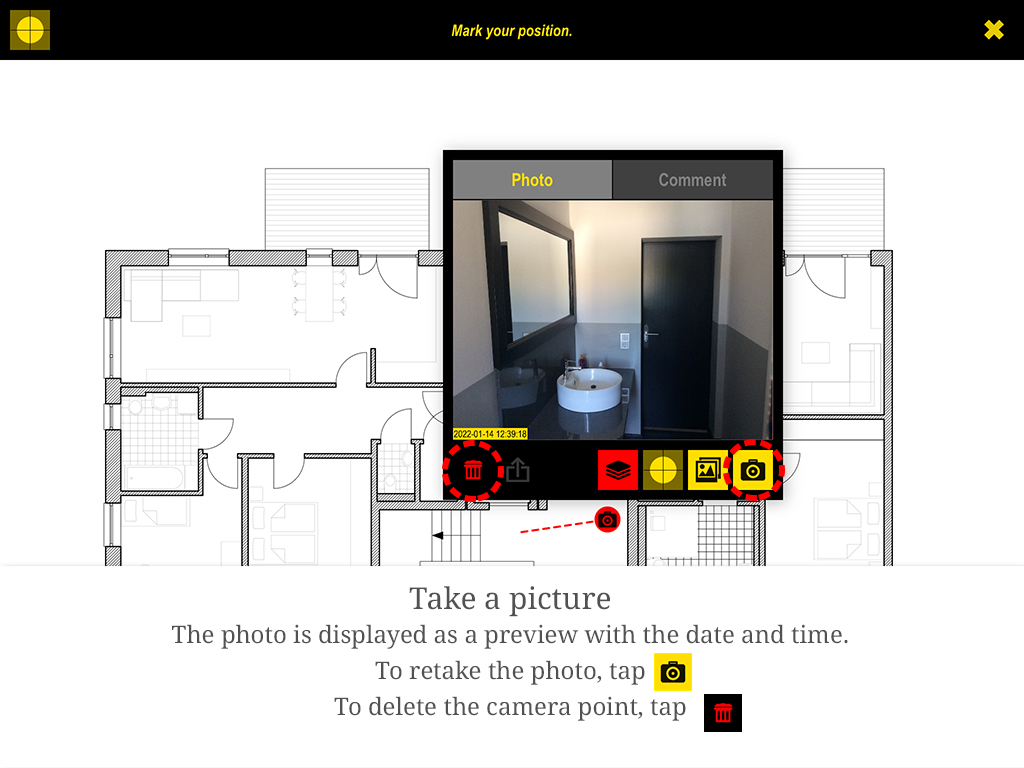
You bring the floor plan onto the iPad as a PDF, JPG or PNG – via the Files app or over Wi-Fi from your computer. On site, tap your position and the viewing direction, then take the photo.
The photo appears as a viewing cone on the plan, with date and time. Type or dictate a comment right away.
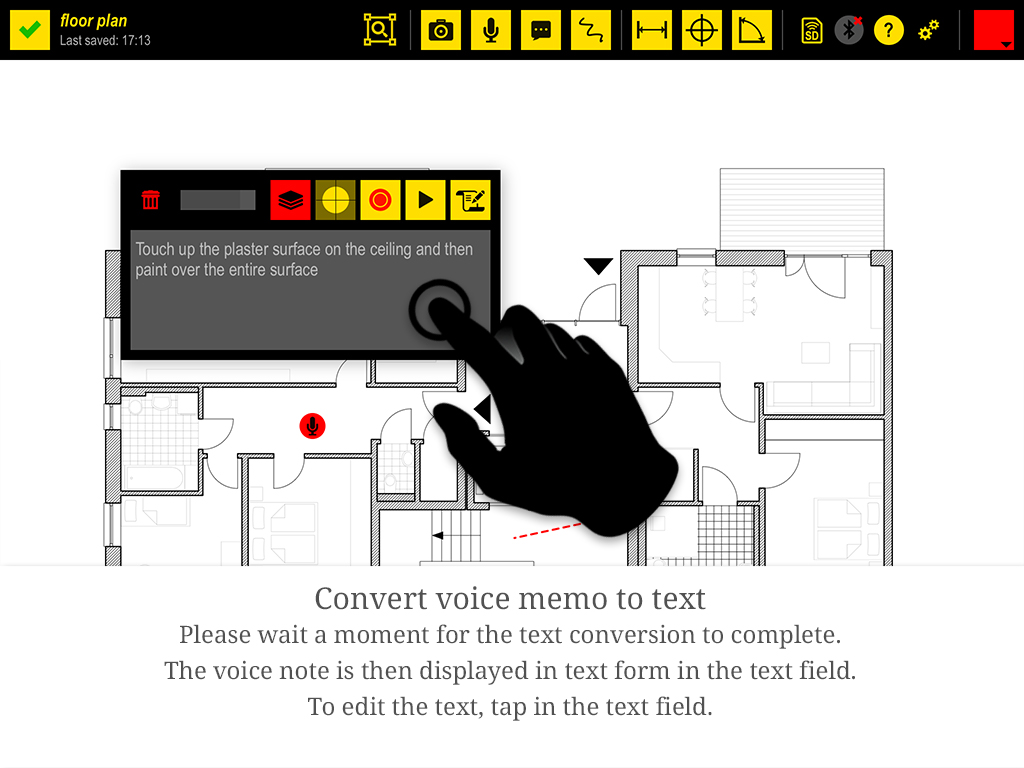
When your hands are full, just record the defect. The voice note sits at the right spot on the plan, and Plaans can convert it to text.
You can correct the transcript, and it appears in the report. Assign entries to one of twelve colour layers – one per trade, for example.
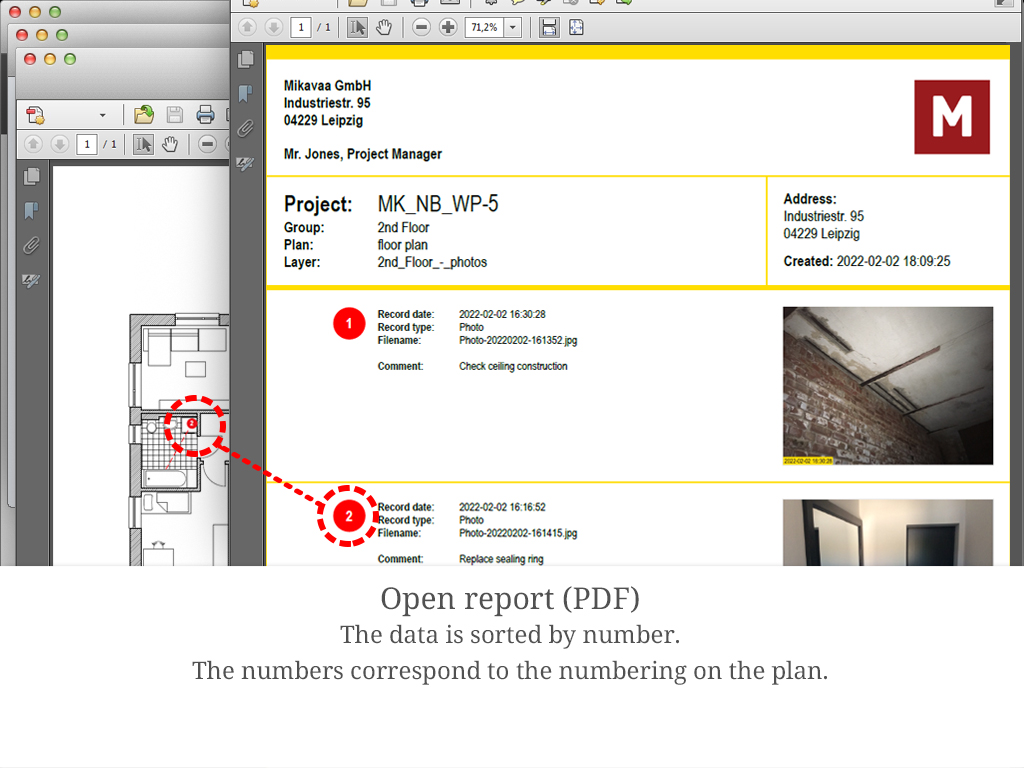
One tap on the share icon and Plaans creates, for each layer, a plan with numbered markers and a data sheet with the same numbers, photos, comments and transcripts.
Your logo and address are in the header. Send the report by email or save it to the Files app – straight from the iPad.
Everything in one ZIP file, neatly sorted by project, group and plan.
One PDF of the plan per layer, with every entry drawn in as a numbered marker. Anyone can find the spot on site again.
Project, address and date in the header, then every entry in number order: when it was recorded, photo, comment, transcript. Optionally with the plan preview as cover sheet.
Enter your company name, address, contact person and logo once in the settings. They appear on every report.
Large photos for details or small ones for more entries per page: you set the image size in the PDF in three steps.
Each layer also comes as an Excel-compatible CSV file, for example to transfer defects into a list or process them further.
An index.html opens the whole project in the browser: click through plans, view photos, play voice notes. No software to install.
Explained step by step in the tutorial.
Yes. Photos, voice notes and the export work completely offline, because everything stays on the iPad. You only need a connection again to send the report by email. More under Your data stays with you.
Plaans has no dedicated status or deadline workflow. What works well in practice is using the colour layers for it: new defects go on the red layer, and you move fixed ones to the green layer with the layers icon. Since each layer gets its own report, you automatically have a list of open items.
Yes, with layers. Each of the twelve colour layers is exported as its own plan PDF with its own data sheet. For example, create one layer for electrical and one for plumbing and name them accordingly.
The report is a finished PDF file. If you want to process the entries further, use the CSV file: it opens in Excel, and the photos are included in the export as individual JPG files.
Yes, Plaans is available for iPad and iPhone. For walkthroughs with large floor plans we recommend the iPad, since you see more of the plan.
You'll find more answers in our FAQ.
Download Plaans, import a floor plan, get started. No account needed.