Tutorial Importing and exporting data

View the exported PDF plans

When you export a project, Plaans automatically creates a PDF file and a matching data sheet for every plan layer.

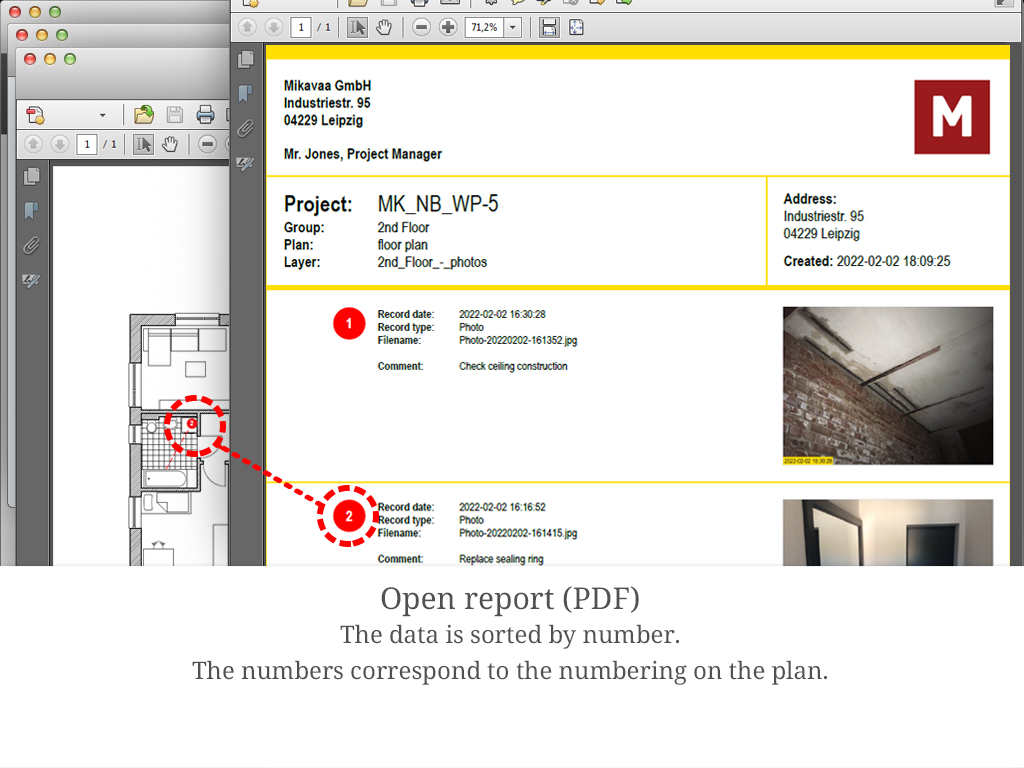
To view them, unzip the ZIP file and open the project folder. Under group > plan > pdf you will find the individual PDF files. All captured data is pinned and numbered on the plan; the data sheet lists the same numbers with full details in a table.

  1. Plaans exports all layers of a plan with their data as PDF files. To open the report, first save the project to your PC (see “Export a project”).
    Plaans exports all layers of a plan with their data as PDF files. To open the report, first save the project to your PC (see “Export a project”).
  2. Go to your Downloads folder and unzip the project’s ZIP file.
    Go to your Downloads folder and unzip the project’s ZIP file.
  3. The project folder is displayed. Open it.
    The project folder is displayed. Open it.
  4. Open the group folder, e.g. “2nd_Floor”.
    Open the group folder, e.g. “2nd_Floor”.
  5. Each plan in the project has its own folder. Open the plan folder you want, e.g. “floor_plan”.
    Each plan in the project has its own folder. Open the plan folder you want, e.g. “floor_plan”.
  6. Open the “pdf” folder.
    Open the “pdf” folder.
  7. Every layer of the plan is available as a PDF, plus a report for each layer.
    Every layer of the plan is available as a PDF, plus a report for each layer.
  8. Open a plan layer, e.g. “floor_plan_2nd_Floor_-_photos.pdf”.
    Open a plan layer, e.g. “floor_plan_2nd_Floor_-_photos.pdf”.
  9. The data is pinned and numbered on the plan.
    The data is pinned and numbered on the plan.
  10. Open the data sheet that belongs to the layer, e.g. “floor_plan_2nd_Floor_-_photos_datasheet.pdf”.
    Open the data sheet that belongs to the layer, e.g. “floor_plan_2nd_Floor_-_photos_datasheet.pdf”.
  11. The data is sorted by number; the numbers match those on the plan.
    The data is sorted by number; the numbers match those on the plan.